GDID: The Windows Global Device Identifier

The GDID is a 64-bit device PUID stored in HKCU as a plaintext REG_SZ. It can be read and overwritten locally, but the real binding happens on Microsoft's servers using hardware descriptors and a TPM-backed device certificate.
In this blog we are going to talk about the GDID some internals stuffs along with the source code.
If you want to dive directly into the source code here is the link for the Repo.
The goal of this blog is to understand GDID and see how we can extract the GDID from System and test if we can actually patch it with another GDID.
GDID basics (Short Intro).
Every Windows install gets a 64-bit number called the GDID (Global Device Identifier). Windows asks login.live.com for it the first time your machine connects to the internet, and stores it in the registry as 16 hex characters like 0018AAAABBBBCCCC.
In decimal with a g: prefix that becomes g:6943049711865036, which is the format Microsoft uses internally and in court filings.
Inside Microsoft's own code this number is called PUID (Passport Unique Identifier). The name comes from .NET Passport, which later became Microsoft Account.
You can still find PassportIdentity.HexPUID in the System.Web.Security docs. GDID is just the public name for a PUID that's been in every consumer Windows install since Vista.
The first two bytes tell you what kind of identifier it is.
0x0018means it belongs to a device.0x0003means it belongs to a user account.
So each Windows install gets one device GDID, and each Microsoft Account signed in on that install gets its own user PUID. If you reinstall Windows you get a fresh number, but Microsoft's server still knows it's the same physical machine because the hardware hasn't changed.
Where does it live on disk ?!
The main copy is stored in plaintext. No encryption, no DPAPI, no elevation needed. Just reg query it:
reg query "HKCU\SOFTWARE\Microsoft\IdentityCRL\ExtendedProperties"
HKEY_CURRENT_USER\SOFTWARE\Microsoft\IdentityCRL\ExtendedProperties
    LID    REG_SZ    0018AAAABBBBCCCC
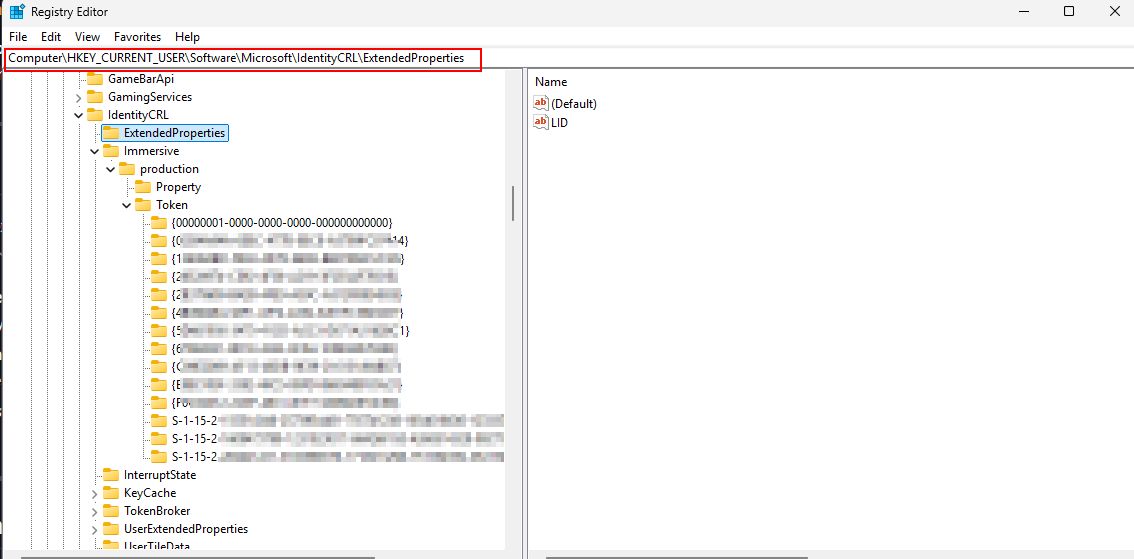
As you have seen. Sixteen hex characters in a REG_SZ, sitting in the current user's hive, readable by any process running as that user. That LID value is your device PUID in hex. Everything else (Store licensing, activation, CDP, WNS, telemetry) flows from that number and a matching device certificate.
The second location is the one that actually matters. HKCU\...\Immersive\production\Token\{AppContainerSID}\DeviceTicket holds a DPAPI-wrapped blob (header GUID example: df9d8cd0-1115-11d1-8c7a-00c04fc297eb).
Inside that blob there is an device certificate wlidsvc uses to prove itself to Microsoft, with the PUID baked into the cert.
Third spot: HKLM\...\IdentityCRL\NegativeCache\<UserPUID>_<UserSID>. The Subkey names that pair user PUIDs to local SIDs. If you're doing forensics on a shared machine, this is where you look.
All of this is managed by wlidsvc (Microsoft Account Sign-in Assistant), running out of C:\Windows\System32\wlidsvc.dll. Dump the strings from that DLL and you can see the whole class hierarchy:
DeviceIdStore::LoadFromRegistry
DeviceIdStore::GetRegistryPath
DeviceIdStore::LogToRegistry
CDeviceIdentityBase::CreateNewDeviceIdentity
CDeviceIdentityBase::BindDeviceToHardware
CDeviceIdentityBase::GetDeviceCert
CAssociateDeviceRequest::ParseResponseBody
Microsoft even left the source path in there:
onecoreuap\ds\ext\live\identity\ntservice\lib\svccommon\deviceidstore.cpp

(Several of these function names were first documented by the SmtimesIWndr/gdid-reversal writeup on GitHub. Worth a read if you want the RE angle without the tooling.)
How Microsoft issues it
First time a fresh Windows install hits the internet, wlidsvc phones home. It sends a POST to https://login.live.com/ppsecure/deviceaddcredential.srf asking for a device identity.
The body is a SOAP envelope containing a <DeviceInfo> block with <Component> tags. Each tag is a hardware descriptor with a numeric name. MDM admins will recognize these because Autopilot uses the same set in its hardware hash:
| Tag | Descriptor |
|---|---|
| 4097, 4098 | System manufacturer |
| 4099 | Product name |
| 4100 | Version |
| 4101 | SMBIOS system serial |
| 4102 | SMBIOS UUID |
| 4112, 4113 | Disk serial numbers |
| 4128 | MAC address |
| 4130 | Network adapter bus name |
| 4144 | 32-byte value (probably a cert thumbprint or SHA-256, publicly undocumented) |
| 8195, 8196, 8197 | Mystery values, still undocumented in 2026 |
Plus a TPM public key. That's everything wlidsvc sends.
Microsoft's server does something with all of that (nobody outside Redmond knows the exact algorithm) and sends back a SOAP response like this:
<DeviceAddResponse Success="true">
    <success>true</success>
    <puid>0018XXXXXXXXXXXX</puid>
    <DeviceTpmKeyState>0</DeviceTpmKeyState>
    <License>...</License>
    ...
</DeviceAddResponse>
That <puid> element is your device GDID. wlidsvc parses it via CAssociateDeviceRequest::ParseResponseBody, calls DeviceIdStore::LogToRegistry, and writes the hex to HKCU\...\IdentityCRL\ExtendedProperties\LID. From that point on, it stays for the lifetime of the install.
The client doesn't compute this ID. Microsoft's server assigns it. So the server decides whether a set of hardware descriptors counts as the same device it saw before. Same hardware will always resolve to a linkable identity on Microsoft's side, no matter how many times the local number changes.
How Microsoft actually uses it to track you
Once wlidsvc has the PUID and a device certificate, that pair shows up on every call the OS makes to Microsoft services. All of them.
Microsoft Store - Every purchase, license, and app install is tied to the device PUID. When you see PUR-AuthenticationFailure in a Store error dialog, that's the PUID chain breaking.
Windows Activation - Digital licenses tied to your MSA are indexed by device PUID on Microsoft's end.
Connected Devices Platform - cdp.dll calls GetStableDeviceIdFromProvider, grabs the PUID, and sticks g: in front before publishing to dds.microsoft.com. This is what makes Your Phone and cross-device clipboard work.
WNS - Your push channel URI has the PUID in the path.
Delivery Optimization - dosvc reports the GDID as UCDOStatus.GlobalDeviceId.
Telemetry - Almost every Microsoft.Windows.* ETW event has a Device.ID field. That field is the GDID. With optional diagnostics turned on, every crash report and heartbeat carries this number.
Microsoft Edge. With enhanced diagnostics on, Edge sends URL-visit records tagged with the GDID. This is exactly what produced the browsing-history evidence in the US v. Stokes complaint.
That complaint (US v. Peter Stokes, N.D. Ill., July 2026) tied an ngrok account to a specific defendant using nothing but a Global Device Identifier from Microsoft's records. Microsoft's own representative called the GDID a persistent, device-level identifier designed to uniquely identify an installation of a Windows operating system on a device.
Pulling your own GDID out
The repo has three builds of the same tool: get_gdid.exe (C), gdid.exe (Rust), and get_gdid.x64.o / get_gdid.x86.o (BOF for Cobalt Strike / COFFLoader). They all do the same thing.
Run the Rust version:
.\gdid.exe
[+] Windows GDID + hardware descriptor report
    wlidsvc.dll -> HKCU IdentityCRL\ExtendedProperties\LID

[*] Passport Unique ID  (HKCU\SOFTWARE\Microsoft\IdentityCRL\ExtendedProperties\LID)
    LID (hex)            : 0018AAAABBBBCCCC
    PUID (dec)           : 6943049711865036
    Namespace            : 0x0018 (device PUID)
    GDID                 : g:6943049711865036

[*] Neighbouring identifiers
    MachineGuid                  : 12345678-1234-1234-1234-123456789abc
    SQM MachineId                : {12345678-1234-1234-1234-123456789ABC}
    IDCRL version                : 8.0.26100.8521
    Login URL                    : https://login.live.com
    Device DNS suffix            : .devicedns.live.com

[*] User PUIDs  (HKLM\SOFTWARE\Microsoft\IdentityCRL\NegativeCache)
    0003DEADBEEF1234  dec=1089262744179252  sid=S-1-5-21-1111111111-2222222222-3333333333-1001

[*] SMBIOS  (GetSystemFirmwareTable 'RSMB')
    SMBIOS version       : 3.5
    Manufacturer  (4097) : <Your PC Manufacturer>
    Product       (4099) : <Your PC Model>
    Version       (4100) : 1.0
    Serial number (4101) : SN0123456789ABC
    UUID          (4102) : ABCDEF01-2345-6789-ABCD-EF0123456789
    SKU                  :
    Family               : <Your PC Family>

[*] TPM Endorsement Key  (Microsoft Platform Crypto Provider)
    EKPub blob size      : 283 bytes
    EKPub SHA-256        : deadbeefcafefeeddeadbeefcafefeeddeadbeefcafefeeddeadbeefcafefeed

[*] Physical disks  (IOCTL_STORAGE_QUERY_PROPERTY)
    PhysicalDrive0  serial=EXAMPLE_NVME_SERIAL_1234   model=<Sample NVMe SSD>
    PhysicalDrive1  serial=EXAMPLE_SATA_SERIAL_5678   model=<Sample SATA SSD>

[*] MAC addresses  (GetAdaptersAddresses)
    eth    00:00:5E:00:53:11  Ethernet
    wifi   00:00:5E:00:53:22  Wi-Fi
Doesn't need admin or elevation. Standard Windows APIs, all unprivileged.
If you just want the GDID without the full hardware dump, three lines of PowerShell:
$lid  = (Get-ItemProperty -Path 'HKCU:\SOFTWARE\Microsoft\IdentityCRL\ExtendedProperties' -Name LID).LID
$puid = [Convert]::ToUInt64($lid, 16)
"LID  : $lid"
"PUID : $puid"
"GDID : g:$puid"
BOF operators can load the .cna and run get_gdid in a beacon console. Output goes through BeaconPrintf.
Mitigations ??
| What you can try | What breaks | Does it stop Microsoft from tracking you? |
|---|---|---|
Disable wlidsvc | Store, digital-license activation, UWP apps, CDP, WNS push | Yes, until you sign into any MSA. Then it re-registers. |
Firewall login.live.com | Same as above | Same as above. |
Delete the LID, restart wlidsvc | Nothing | No. New PUID on disk, but server links it back to the same hardware. |
| Reinstall Windows | Nothing (clean slate) | No. New cert, new PUID, same hardware. Server binds them together. |
| Replace the hardware (motherboard + disks + NIC) | Your wallet | Yes. New SMBIOS UUID, new serials, new MACs, new TPM EK. Genuinely different machine. |
You can rotate the on disk number whenever you want. Microsoft's server re links it to your hardware within one wlidsvc call. The only real reset is new hardware.
The best thing you can do is to use windows on VM !
Can we patch a different GDID onto our user ?!
This was the fun part of the research. The LID sits in HKCU as a plaintext REG_SZ. The DeviceTicket cert is DPAPI-wrapped but decryptable with admin. The hardware descriptors are spoofable on a VM. So how far can we actually push this?
Microsoft's device identity has four layers stacked on top of each other. Each patching attempt gets through one or more before hitting a wall:
Here's what happened with each.
Attempt 1: overwrite the LID only
The repo includes gdid-patch.exe for this. Give it the new LID hex and it writes the registry value.
Extract your GDID from machine A:
C:\tools> gdid.exe

[*] Passport Unique ID  (HKCU\SOFTWARE\Microsoft\IdentityCRL\ExtendedProperties\LID)
    LID (hex)            : 0018AAAABBBBCCCC
    PUID (dec)           : 6943049711865036
    GDID                 : g:6943049711865036
Copy that LID to machine B (a VM) and patch:
C:\tools> gdid-patch.exe 0018AAAABBBBCCCC
before: LID = 0018111122223333  (GDID = g:6755468662874931)
after : LID = 0018AAAABBBBCCCC  (GDID = g:6943049711865036)
Confirm:
C:\tools> gdid.exe

[*] Passport Unique ID  (HKCU\SOFTWARE\Microsoft\IdentityCRL\ExtendedProperties\LID)
    LID (hex)            : 0018AAAABBBBCCCC
    PUID (dec)           : 6943049711865036
    GDID                 : g:6943049711865036
The VM now shows machine A's GDID. Any local tool reading the LID sees the patched value.
But this only changes layer 1. The DeviceTicket blob (layer 2) still has the VM's original certificate with the VM's real PUID inside it. The moment wlidsvc talks to the network (Store opens, activation runs, WNS refreshes), it sends that certificate. Microsoft's server matches it to the VM's original PUID and ignores whatever the registry says.
Then DeviceIdStore::LoadFromRegistry notices the mismatch and overwrites the LID back. The whole thing undoes itself within minutes.
Cosmetic only. Fools local tools but not Microsoft. Self-reverts.
Attempt 2: extract and import the device certificate
This goes after layers 1 + 2. Move both the LID and the device cert from machine A to the VM. Now wlidsvc on the VM has a real Microsoft-signed cert for machine A's PUID. No mismatch, so no self-revert.
The DeviceTicket is DPAPI-encrypted, but as admin or SYSTEM on machine A you can decrypt it. Run as SYSTEM via PsExec and call CryptUnprotectData, or dump the DPAPI master keys from LSASS and decrypt offline. Either way you get the raw X.509 cert and its private key.
Re-encrypt the blob under the VM's DPAPI keys, write it to the VM's DeviceTicket path, set the matching LID, restart wlidsvc. The VM now has a valid cert for machine A's PUID. Locally it holds up.
But layer 3 kills it. Next time wlidsvc authenticates to login.live.com, the SOAP request also sends the VM's hardware descriptors. Microsoft's server sees a valid cert claiming to be machine A, paired with hardware that doesn't match machine A's fingerprint. Most likely Microsoft forces a fresh registration and hands the VM a new PUID, wiping out your import.
Survives locally until the next wlidsvc network call. Then the hardware check catches it.
Attempt 3: cert import + hardware spoofing on a VM
This goes after layers 1 + 2 + 3. Same cert import, but now you also configure the hypervisor to match machine A's hardware:
- SMBIOS UUID (tag 4102): VMware
.vmx→uuid.bios = "...". QEMU →-smbios type=1,uuid=.... Hyper-V →Set-VMFirmware. - SMBIOS serial / manufacturer / model (tags 4097-4101): same config files, all spoofable.
- MAC addresses (tag 4128): hypervisor NIC settings.
- Disk serials (tags 4112-4113): VMware
.vmdkdescriptor. QEMU →-drive serial=....
All straightforward in a VM. Then you hit the TPM.
Machine A has a physical TPM with a unique Endorsement Key (EK). The public half is readable by anyone (NCryptGetProperty(NCRYPT_PCP_EKPUB_PROPERTY)). The private half was generated inside the chip and has never left it. When Microsoft's server wants to verify the TPM, it works like this:
- Server encrypts a random nonce with the EK public key and sends it to the device.
- The device's TPM decrypts it using the EK private key (via
TPM2_ActivateCredential). - Device sends back the decrypted nonce. Proof of possession.
The VM's vTPM has a different key pair. It can't decrypt a challenge meant for machine A's EK because it doesn't have machine A's private key. That key lives in silicon on machine A's motherboard.
You can inject machine A's EK public key into swtpm's state files. The server will encrypt the challenge for that public key. But the vTPM can't decrypt it because it's missing the private half.
Three options from here. Remove the vTPM and hope wlidsvc's non-TPM fallback path works (unknown if Microsoft accepts a device that previously had a TPM suddenly showing up without one). Keep the vTPM with its own EK and hope Microsoft doesn't check the EK against what it recorded (also unknown). Or relay the TPM challenge over the network to machine A's physical TPM using a modified swtpm build. That last one works in principle but nobody's published a ready-made tool for it.
The TPM EK is the hard cryptographic wall. Without the relay, this attempt fails at the crypto layer. With the relay, you're looking at a real engineering project.
Attempt 4: nuke IdentityCRL and let it re-register
Stop-Service wlidsvc
Remove-Item 'HKCU:\SOFTWARE\Microsoft\IdentityCRL' -Recurse -Force
Remove-Item 'HKLM:\SOFTWARE\Microsoft\IdentityCRL' -Recurse -Force
Start-Service wlidsvc
wlidsvc re-registers on the next network call. Fresh PUID. But same hardware, so Microsoft's server maps it to the same device record it already had. New number on your end. Same identity on theirs.
What we learned
| Attempt | Layers patched | Survives locally? | Survives Microsoft server check? |
|---|---|---|---|
| 1. LID overwrite only | 1 | Minutes (self-reverts) | No |
| 2. Cert import | 1 + 2 | Until next wlidsvc call | No (hardware mismatch) |
| 3. Cert import + HW spoof + vTPM | 1 + 2 + 3 (partial) | Yes | Unknown (TPM EK is the blocker) |
| 4. Nuke and re-register | Resets 1 + 2 | Yes (fresh PUID) | Server links new PUID to same HW |
Layer 4 is the problem. The server-side record is the source of truth, and everything on your disk is just a cached copy. You can't fix the real thing by patching the cache.
The closest path to full device impersonation is attempt 3 with a TPM relay, and that's a serious engineering effort with three open questions about Microsoft's server-side behavior. If you want to test it, start simple:
- Cert import + HW spoof + no vTPM. Does Microsoft's server accept a device that used to have a TPM now showing up without one?
- Cert import + HW spoof + mismatched vTPM. Does the server check the EK against what it recorded?
- Only if both fail: build the relay on QEMU + modified swtpm.
So where does that leave us
The weird thing about GDID isn't that it exists. Every OS vendor has some kind of install identity. What's unusual is how visible Microsoft left it. Sixteen hex characters, plaintext, in HKCU, readable by any user process, no elevation. It's been in the same registry key for over a decade, tagged onto every telemetry event, every Store transaction, every activation call, every push channel. And until the Stokes complaint brought it into public view, most people had no idea it was there.
You can read yours with gdid.exe. You can overwrite it with gdid-patch.exe. Both take seconds. And neither changes what Microsoft knows about your device, because that record lives on their servers, not in your registry.
One last thing your real GDID is not something to share publicly. It's a persistent identifier that Microsoft will hand to law enforcement, it never rotates, and combined with your SMBIOS UUID and TPM EK it fingerprints your hardware for good. Look at it. Understand what it does. Then forget about it.