Make Your Rust Implant More OPSEC

Strip symbols, remap absolute paths, recompile std with build-std, encrypt strings, and bypass IsDebuggerPresent without touching the IAT. Small deltas, big drop in what a malware analyst gets to see.
Tips & Tricks for your Next Loaders
When we spend weeks building custom loaders, tweaking syscalls, and dodging EDR hooks, only to get burned by the most basic OPSEC failure. In this blog we are going few steps further making Analysis Difficult for Malware Analysts.
Introduction
By default, cargo build --release isn't designed for stealth; it's designed for stability. It keeps "panic unwinding" information so that if your tool crashes, it can print a nice, helpful stack trace telling you exactly which line of code failed.
For a developer? Great. For an operator? A disaster.
If my implant crashes on a target endpoint, I want it to die silently and vanish. I definitely don’t want it printing Panicked at src/main.rs:45 to the event logs.
So here we are going to share some of the tips/tricks that would help to increase the OPSEC of your code and make analysis hard..
The Basics (Cargo.toml)
First, we need to tell the compiler to stop hoarding symbols. In your Cargo.toml, you need to set the release profile to strip everything and abort on panic.
[profile.release]
strip = true        # No symbols. No debug info.
opt-level = "z"     # Optimize for size. Makes control flow annoying to reverse.
lto = true          # Link Time Optimization.
panic = "abort"     # If it crashes, kill the process immediately. No unwinding.
codegen-units = 1   # Take your time, compiler. Squeeze every byte.
This gets rid of the function names, but if you run strings again, you’ll still see those file paths.
Lying to the Compiler (Path Remapping)
This is the part that drives everyone crazy. Even with strip = true, the compiler records the source file location for panic messages. For example: my username of the PC is ASUS and it will record C:\Users\ASUS path ? That’s for the error message that might happen.
We can’t change where the files live on our disk, but we can lie to the compiler about it.
To do that we can need to define .cargo/config.toml in the project root or you can add this in the Cargo.toml. This file tells rustc to rewrite the paths before they ever touch the binary.
[build]
rustflags = [
    # 1. Remap your specific user path to a generic root
    "--remap-path-prefix", "C:\\Users\\ASUS=/",
    # 2. Remap the current project directory to a dot
    "--remap-path-prefix", "src/=.",
]
Now compile it simply using cargo build --release.
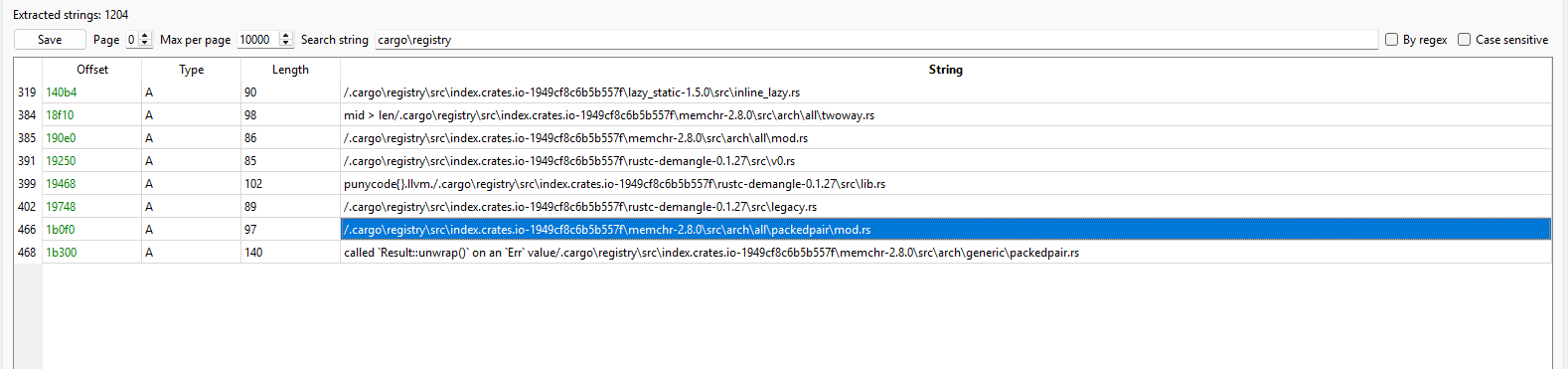
Fig 1: Pe-Bear View
But this will not work as expected, because the Rust Standard Library (std, core, alloc) is pre-compiled.
When you download Rust, you download "baked" .rlib files that were compiled on an machine (likely a CI server or your initial installer setup). Those files already contain the paths. Your rustflags only apply to your code, not the pre-compiled library code you are linking against.
To remove the user path C:\Users\ASUS from the standard library (and ensure it's gone from dependencies like memchr), you must recompile the standard library yourself.
This requires Rust Nightly. You cannot do this on Stable.
This is simple install the Nightly Toolchain
rustup toolchain install nightly
rustup component add rust-src --toolchain nightly
Update your .config/config.toml and recompile it
cargo +nightly build --release -Z build-std=std,panic_abort --target x86_64-pc-windows-msvc
This will:
+nightly: Uses the nightly compiler.-Z build-std=std,panic_abort: Tells Cargo: "Ignore the pre-compiled standard library. Compile a fresh one from source right now."--target ...: Explicitly sets the target (required when usingbuild-std).
Now lets check the resource again ...
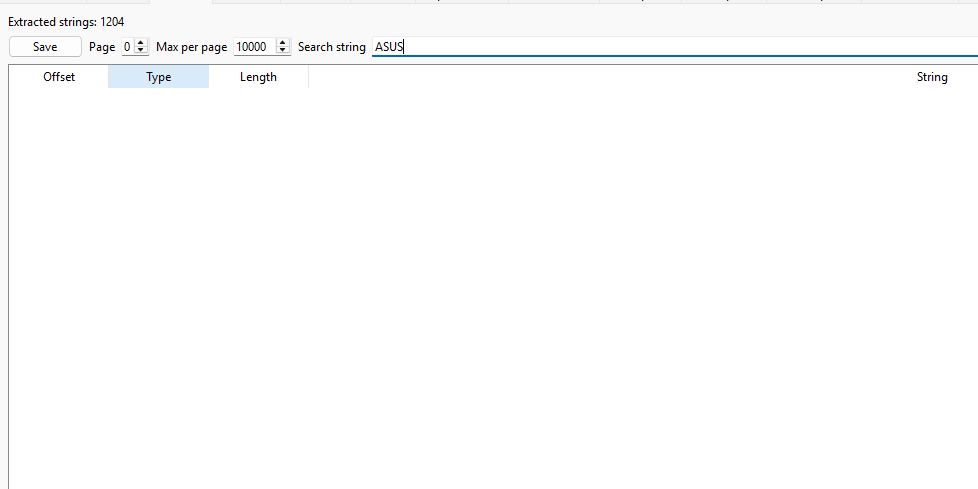
Fig 2: Pe-Bear String view
Why this works (and why the previous attempt failed)
-
In the Previous attempt we compiled when compiling the code compiler linked it with
std.lib(which already hadASUSwritten inside it from when you installed Rust). -
Now in the nightly version we are compiling the code and
std.libfrom scratch. basically compilingstd.libyourself, yourrustflags(the remapping) will finally apply to the standard library files too.
Also you can notice the size of the image ? Its less compared to the normal version !!
Also in the malware development is it possible to develop
| Feature | Stable Rust | Nightly Rust |
|---|---|---|
| String Hiding | POOR. You are forced to link against pre-compiled .rlib files that contain "C:\Users\Builder..." paths from the build server. | EXCELLENT. You can use -Z build-std to recompile std from scratch, stripping all upstream paths and strings. |
| Panic Handling | POOR. Binaries contain error strings like "index out of bounds". You cannot easily remove the formatting logic. | EXCELLENT. You can use panic_immediate_abort, which removes all panic strings and formatting logic, leaving only a single ud2 (crash) instruction. |
| Binary Size | LARGER. Includes overhead for backtraces and formatting you can't disable. | SMALLER. You can strip out core dependencies (like forcing no_std easier) or remove panic infrastructure. |
| Fingerprinting | HIGH. AV/EDR vendors have signatures for standard Rust libraries. Your binary looks like every other Rust binary. | LOWER. Because you compile std yourself with custom flags, your binary's memory layout and instruction sequence will be unique to you, breaking hash-based signatures. |
| Obfuscation | HARD. You are limited to what LLVM offers by default. | EASIER. You can use experimental features like #[obfuscate] (if using a custom fork) or aggressive inline assembly asm! which was Nightly-only for a long time. |
So Switch to Nightly, use -Z build-std, and enabling panic_immediate_abort is the standard for OPSEC-aware Rust development.
Use Runtime Encryption to avoid strings
Even with strip=true, your hardcoded strings (IP addresses, "cmd.exe", "whoami") are visible in plain text. If an analyst runs the strings command on your binary, they will see exactly what your malware does.
So for that you can encrypt strings during compilation so they only exist as encrypted bytes in the binary. They are decrypted in memory only when needed.
Use the crate obfstr or litcrypt.
For example:
using libcrypt gives
#[macro_use]
extern crate litcrypt;

use_litcrypt!();

fn main(){
    println!("his name is: {}", lc!("Voldemort"));
}
As you can see in the Pe-Bear, we cant find the string Voldemort !
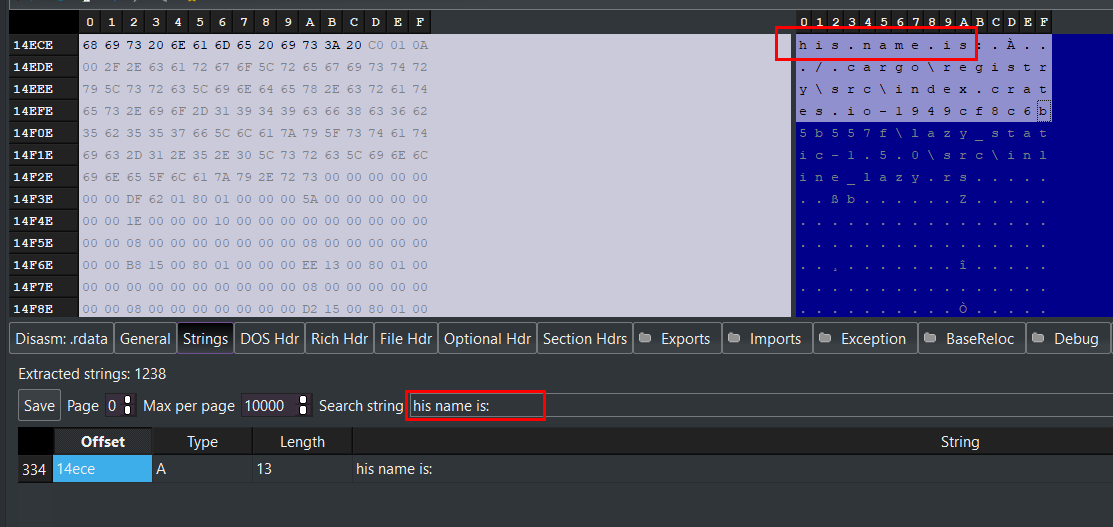
Fig 3: Binary Analysis
And for the dynamic analysis we can use the Anti-Debug features such as UnhandledExceptionFilter or check IsDebuggerPresent API by checking the PEB
use windows_sys::Win32::UI::WindowsAndMessaging::{MB_OK, MessageBoxA};

use std::arch::asm;
use windows_sys::core::s;

fn check_teb() -> i32 {

    #[allow(unused_assignments)]
    let mut is_being_debugged: i32 = 0;

    unsafe {
        asm!(
            "mov rax, gs:[0x60]",
            "movzx eax, byte ptr [rax + 0x02]",
            "mov {0:e}, eax",
            out(reg) is_being_debugged,
        );
    }
    is_being_debugged
}

fn main() {
    if check_teb() != 0 {
        unsafe {
            MessageBoxA(
                std::ptr::null_mut(),
                s!("Debugger Detected"),
                s!("Info"),
                MB_OK,
            );
        }
    }
}
Here, the code manually dereferences the TEB (Thread Environment Block) to locate the PEB, then reads the BeingDebugged flag directly from memory, bypassing the need for the kernel32!IsDebuggerPresent API call.
This works by getting the GS segment register points to the TEB (Thread Environment Block) for the currently executing thread. At offset 0x60 of the TEB structure resides the pointer to the PEB (Process Environment Block). Then the code loads the linear address of the PEB into the RAX register.
- In
PEBstructure is an opaque kernel structure, but the byte at offset0x02is known to be theBeingDebuggedflag (aUCHARoru8). - It performs a zero-extend move (
movzx) of that single byte into theEAXregister.1(TRUE): The process is being debugged.0(FALSE): The process is running normally.
Calling IsDebuggerPresent() puts an entry in your IAT (Import Address Table). A static analyst sees this import immediately in tools like PE-Bear or IDA Pro and knows you are checking for debuggers.
By writing it in assembly, you avoid importing the function from kernel32.dll. The string "IsDebuggerPresent" will not appear in your binary's import table. This also bypasses user-mode API hooks. If an EDR or anti-cheat has placed a JMP hook on the IsDebuggerPresent function in memory, this code ignores it because it reads the kernel structure directly.
Statically linking libraries (Bonus Tips)
If you are testing the binary on your older machines, you sometimes see an error like this: The code execution cannot proceed because VCRUNTIME140.dll was not found" when running your binaries on remote machines.
To fix this, you need to statically link the so-called VCRuntime. First, add the following line to Cargo.toml:
[build-dependencies]
static_vcruntime = "2.0"
Then, add the program in your build.rs program:
 fn main() {
    static_vcruntime::metabuild();
}
Then recompile and the issue will be gone.
Another way to accomplish the same goal is to create a .cargo folder in the root of the project, and place a config.toml file inside of it with the following content:
rustflags = ["-C", "target-feature=+crt-static"]
This compiler flag will statically link the entire C runtime, meaning both VCRuntime and UCRT. This increases the final executable size but also removes all IAT entries regarding the C runtime.
Thanks for reading